

In this article
TL;DR: Workflow automation is never finished because processes, systems, and rules keep changing. A dedicated development team gives you a standing group that maps, builds, runs, and improves automations over time. Most companies start with a pod of four to six people and add roles as the backlog grows. In 2026, a dedicated team beats a one-off project when you have many workflows to automate and need someone to own them after launch.
Dedicated development team workflow automation means a standing, multi-role team that designs, builds, and runs your automated processes over time. Unlike a one-off project, the team stays with your business, learns your systems, and keeps improving each workflow. Therefore, it fits companies with a long list of manual processes and no one to own them. For the full model, read our dedicated development teams guide.
This article explains why automation needs a persistent team. Next, it shows what that team owns, how to staff it, and how to measure results. Finally, it gives a 90-day launch plan and the mistakes to avoid.
Why Workflow Automation Needs a Dedicated Team, Not a One-Off Project
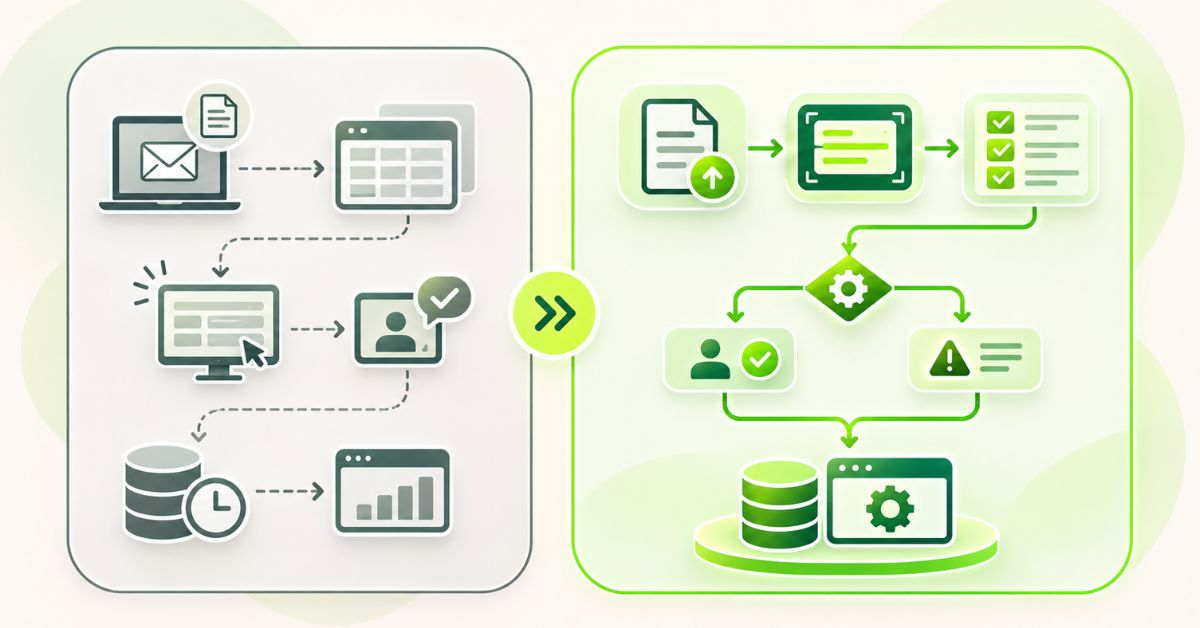
Most business processes were never designed to be automated. They grew over years across email, spreadsheets, and disconnected tools. As a result, automating them takes ongoing work, not a single build.
The opportunity is large. According to McKinsey Global Institute, generative AI combined with other technologies has the theoretical potential to automate work activities that take up 60 to 70 percent of employee time. McKinsey also estimates that generative AI alone could add $2.6 trillion to $4.4 trillion in global corporate profits each year. However, those figures describe what is possible, not what companies have achieved.
Adoption is already widespread. A Gartner Peer Community survey of 300 respondents found that 61 percent say their organization is deploying hyperautomation. Among those organizations, robotic process automation is the most common tool at 72 percent, followed by artificial intelligence at 62 percent. Therefore, most of your competitors are already building these systems.
The hard part is people. A Gartner survey of 437 IT organizations found that 64 percent of IT executives named talent availability as the top barrier to adopting emerging technologies. Meanwhile, the U.S. Bureau of Labor Statistics reports that software developers earned a median of $135,980 in May 2025. Building an in-house automation group from scratch is slow and costly.
A dedicated team solves the ownership problem. The Deloitte Global Outsourcing Survey 2024 drew on more than 500 executives. It lists cost reduction, skilled talent, and agility as key drivers of outsourcing, and a dedicated team delivers all three.
How a Dedicated Development Team Workflow Automation Program Works
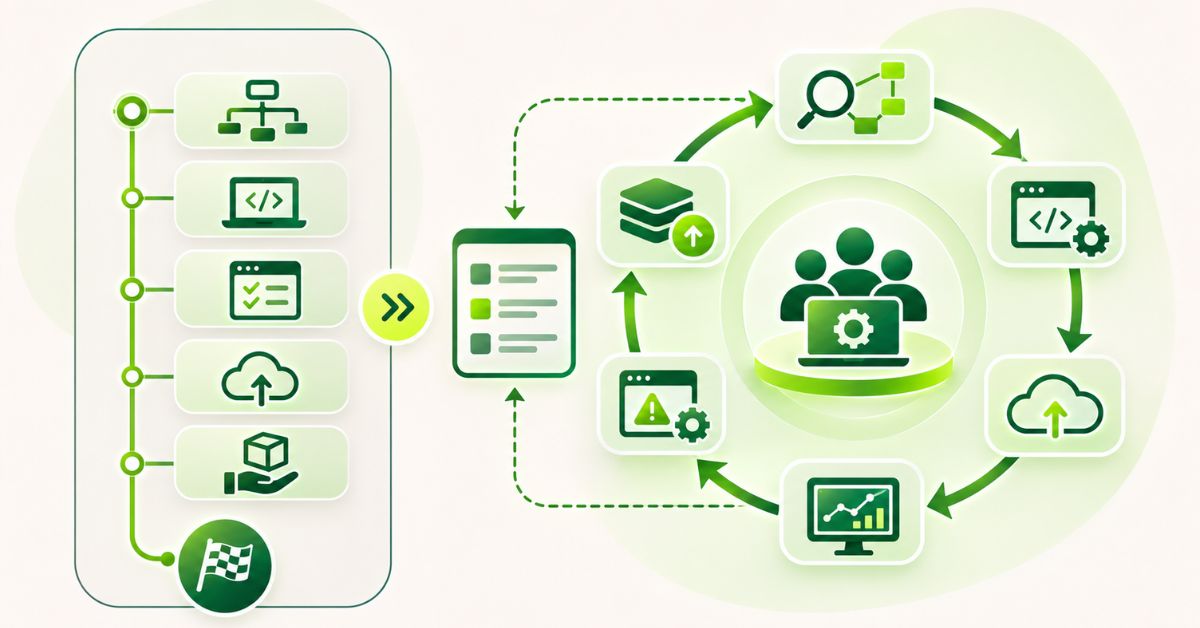
A dedicated team works on your automation backlog full time. It follows your priorities, joins your meetings, and reports to a named owner on your side. Meanwhile, the provider handles recruiting, payroll, and compliance. This model differs from a project vendor, because the team stays after launch and keeps improving the work.
The Five Jobs a Dedicated Team Owns
- Discovery: The team interviews process owners, maps each workflow, and ranks candidates by effort and payoff.
- Build: The team designs and builds automations, from simple triggers to multi-step flows with approvals and exceptions.
- Integration: The team connects your core systems, such as CRM, ERP, billing, and support tools, through stable interfaces.
- Operations: The team monitors every automation, fixes failures, and handles changes when a source system updates.
- Improvement: The team measures results, retires weak automations, and adds new ones from the backlog.
Operations is the job that one-off projects skip. Yet automations break when a form changes, an interface updates, or a rule shifts. Therefore, a team that stays on is the best protection for your investment.
Which Workflows to Automate First
Start with processes that are frequent, rule-based, and painful. For example, invoice handling, employee onboarding, order routing, and report preparation all fit well. In contrast, avoid processes that change weekly or depend on heavy judgment. Rank each candidate on three factors:
- Volume: How often does the process run each week?
- Stability: How rarely do the rules change?
- Payoff: How many hours or errors will you remove?
Team Composition: The Core Pod and Flex Roles
Most automation teams start small. A pod of four to six people can cover a long backlog. Then you add specialists as the work grows. Roles appear here as team detail, so you can see who does what.
| Role | What they do | When you need them |
|---|---|---|
| Tech lead or architect | Owns design, standards, and technical risk | From day one |
| Automation engineers (two or three) | Build and maintain the workflows | From day one |
| Integration engineer | Connects systems and manages data flow | When you link three or more systems |
| QA engineer | Tests flows and edge cases before release | From day one |
| Business analyst or project lead | Maps processes and keeps stakeholders aligned | When the backlog spans many departments |
| AI or data specialist | Adds document reading, classification, and prediction | When flows handle unstructured data |
A small pod keeps costs predictable. Then you scale up as results prove the value. For more on how pods grow, see our guide on scaling from one developer to a dedicated team.
Who Reports to Whom
You name one owner on your side, such as a head of operations or a product leader. That person sets priorities and approves releases. Meanwhile, the team’s tech lead runs daily delivery. Because clear ownership prevents mixed direction, write both names into the engagement terms.
Dedicated Team vs. Other Ways to Automate
You have four common routes. Each one suits a different situation.
| Route | Best for | Main risk |
|---|---|---|
| Dedicated development team | A large backlog and long-term ownership | Needs a clear owner and steady priorities |
| Project-based vendor | One defined automation with a fixed scope | No one owns it after handoff |
| Staff augmentation | One missing skill inside your own team | Relies on your own management time |
| In-house hiring | Permanent core roles | Slow search and high total cost |
A project vendor suits a single, stable process. If that is your case, read our overview of software outsourcing services. Staff augmentation suits a gap in your team, as explained in our staff augmentation guide. For ongoing, multi-process work, however, a dedicated team is the better fit. Our guide to building a dedicated development team that works covers the model in depth.
What It Costs and How to Measure Results
Cost depends on team size, seniority, and region. Typical nearshore dedicated teams run 40 to 60 percent below comparable U.S. hiring, while they still work in U.S. time zones. In addition, a monthly team rate is easy to budget, and you can scale it up or down. Our guide to dedicated development team services explains what the monthly rate includes.
Because automation is a business investment, measure it like one. Track these numbers from the first month:
- Hours saved: Compare manual time before and after each automation.
- Error rate: Count rework, corrections, and failed runs.
- Cycle time: Measure how long a process takes from start to finish.
- Uptime: Track how often each automation runs without a failure.
- Cost savings: Add direct savings and avoided costs, then compare them to the team cost.
Review these numbers every month with your owner. Then retire automations that do not pay back, and move the team to the next item in the backlog.
Security and Compliance for Automated Workflows
Automations touch your most sensitive data, because they move records between systems. Therefore, security belongs in the design from the start. Ask any provider about these controls:
- Role-based access, with access removed when work ends
- Secrets and credentials stored in a managed vault, never in code
- Logging and audit trails for every automated step
- Company-owned repositories, so you keep all code and configuration
- Security certifications, such as ISO 27001
Regulated industries add more rules. For example, healthcare workflows need HIPAA safeguards, and payment workflows need PCI awareness. As a result, ask whether the provider has worked in your industry before you sign.
A 90-Day Launch Plan
| Window | Goal | Example milestone |
|---|---|---|
| Days 1 to 30 | Discover and prioritize | Top ten workflows mapped, first two chosen, access and tools set up |
| Days 31 to 60 | Build and release | First automations live, monitoring in place, baseline numbers captured |
| Days 61 to 90 | Measure and expand | Savings reported, backlog re-ranked, next batch under way |
First, set up access and tools before day one, because waiting for credentials wastes the first week. Next, choose two workflows that are small but visible. Then release them quickly and share the results with stakeholders. Finally, use that proof to win support for the next batch.


Common Mistakes With a Dedicated Automation Team
- Automating a broken process. Fix the process first, because automation only makes a bad process faster.
- Starting with the hardest workflow. Begin with quick wins, so the team builds trust early.
- Skipping operations. Without monitoring, silent failures erase your savings.
- Leaving ownership unclear. Name one owner on your side from day one.
- Ignoring change management. Staff need training, or they will keep using the old process.
- Measuring nothing. Without baseline numbers, you cannot prove the value.
Teams that also plan to add intelligence should read our guide to AI development services with dedicated engineers. Likewise, our overview of robotic process automation development explains one common building block.

How ParallelStaff Helps You Build a Dedicated Team for Automation
ParallelStaff builds dedicated teams of senior Latin American engineers for U.S. companies, and our proof points are specific and checkable:
- Ranked #502 on the 2025 Inc. 5000 list
- 94 percent engineer retention
- ISO 27001 certified
- 4.8 out of 5 rating on Clutch
- Enterprise clients that have included AT&T, AMD, Google, J.Crew, and Whirlpool
We have also delivered automation at scale. In our AT&T case study, a nearshore team of automation specialists streamlined workflows across several business units. The work delivered over $500,000 in combined direct and indirect cost savings, and nearly 80 percent of automation initiatives produced direct savings.
Our process starts with your backlog. First, we help you size the pod and define each role. Then we match vetted engineers to your systems and working hours. After that, we run the cadence with you, from discovery through monthly results reviews. Explore our dedicated development teams and our wider software development services to see how it works.


For related team examples, see our guides to a dedicated development team for a SaaS platform and a dedicated development team for an eCommerce platform. Also, our overview of nearshore software development explains how the delivery model works.
Frequently Asked Questions About a Dedicated Team for Workflow Automation
What is a dedicated development team for workflow automation?
It is a standing group of engineers and analysts that works only on your automation backlog. The team maps processes, builds automations, runs them, and improves them over time. Meanwhile, the provider handles hiring, payroll, and compliance.
Why do I need a dedicated team instead of a one-off automation project?
Automations need care after launch, because systems and rules keep changing. A one-off vendor hands off the work and leaves. In contrast, a dedicated team keeps every workflow running and keeps adding new ones.
How big should a workflow automation team be?
Most companies start with four to six people. That usually means a tech lead, two or three automation engineers, and a QA engineer. Then you add an integration engineer or an analyst as the backlog grows.
How much does a dedicated automation team cost?
Cost depends on team size, seniority, and region. Typical nearshore dedicated teams run 40 to 60 percent below comparable U.S. hiring. However, compare the total monthly cost to the savings the team delivers.
How long does it take to see results?
Most teams release their first automations within the first 60 days. Because early wins build support, pick small, visible workflows first. Then expand as the results come in.
Which workflows should we automate first?
Choose processes that are frequent, rule-based, and painful. For example, invoice handling, onboarding, and order routing are common starting points. Avoid processes that change weekly or depend on heavy judgment.
Is a dedicated team better than staff augmentation for automation?
It depends on the gap. Staff augmentation adds one skill to your own team, and your managers direct the work. A dedicated team suits a large backlog, because the provider supplies a structured pod and a tech lead.
Who manages a dedicated automation team?
You name one owner on your side, who sets priorities and approves releases. Meanwhile, the team’s tech lead runs daily delivery. As a result, you keep control without managing every task.
How do I measure the return on workflow automation?
Track hours saved, error rates, cycle time, uptime, and cost savings. Capture baseline numbers before each automation goes live. Then review the results with your owner every month.
How do you keep automated workflows secure?
Use role-based access, a managed vault for credentials, and audit logs for every step. In addition, keep all code in company-owned repositories. Ask the provider about certifications such as ISO 27001.
Can a dedicated team work with our existing tools?
Yes. A good team starts by learning your CRM, ERP, billing, and support systems. Then it connects them through stable interfaces, so you do not need to replace your tools.
What happens if the team is not the right fit?
Ask for replacement terms and a trial period before you sign. In addition, set clear 30, 60, and 90 day goals. Because problems show up early, a good provider can swap people quickly.
 Verified Author

Luis Peralta
CEO & Founder
Linkedin Profile